The Right IT Model Depends on What Your Team Can Realistically Own
If one IT employee taking vacation leaves your company without a clear escalation path, the problem may not be the employee. It may be the support model.
The co-managed IT vs managed IT decision is really about ownership. Who handles employee support, servers, cybersecurity, monitoring, patching, vendor coordination, projects, documentation, strategic planning, and after-hours issues? A business with no internal IT staff needs a different operating model from a company with an experienced technology department that simply needs additional capacity or specialist support.
For Louisiana organizations evaluating those options, LAComputech currently offers managed IT services that include server management, virtual technical support, remote monitoring, onsite and remote assistance, and technology planning. Its Managed IT page also specifically states that LAComputech can provide IT staff to augment professionals already working inside a business, making the distinction between full outsourcing and supplemental support especially relevant.
What Is Fully Managed IT?
With fully managed IT services, an outside managed service provider becomes the primary operational IT resource for the organization.
The provider may take responsibility for an agreed combination of:
The exact scope depends on the contract. Managed IT should not be assumed to include every cybersecurity, cloud, hardware, or consulting service automatically.
LAComputech's current Managed IT Services page describes server management, virtual technical support, performance enhancements, remote monitoring, and onsite and remote support.
Fully managed IT generally makes the most sense when a business has no dedicated IT department or does not want internal employees responsible for routine technology operations.
What Are Co-Managed IT Services?
Co-managed IT services divide responsibilities between an internal IT team and an outside provider.
The internal team stays involved. The provider supplements its capacity, coverage, tools, or specialized knowledge.
This is sometimes described as IT staff augmentation, but effective co-management should be more structured than simply adding another technician. Each side needs documented responsibilities, access levels, escalation paths, reporting expectations, and decision authority.
That distinction matters from a cybersecurity perspective as well. NIST Cybersecurity Framework 2.0 emphasizes establishing, communicating, and understanding cybersecurity roles and responsibilities. NIST Cybersecurity Framework 2.0 specifically treats governance and accountability as part of managing cybersecurity risk.
CISA provides similar guidance for businesses working with MSPs, recommending that contracts clearly define which responsibilities belong to the provider and which remain with the customer. CISA's MSP security guidance also stresses understanding an MSP's access and establishing clear incident-response responsibilities.
Co-Managed IT vs Managed IT Responsibility Matrix
There is no universal division of responsibilities. The following matrix shows common starting points.
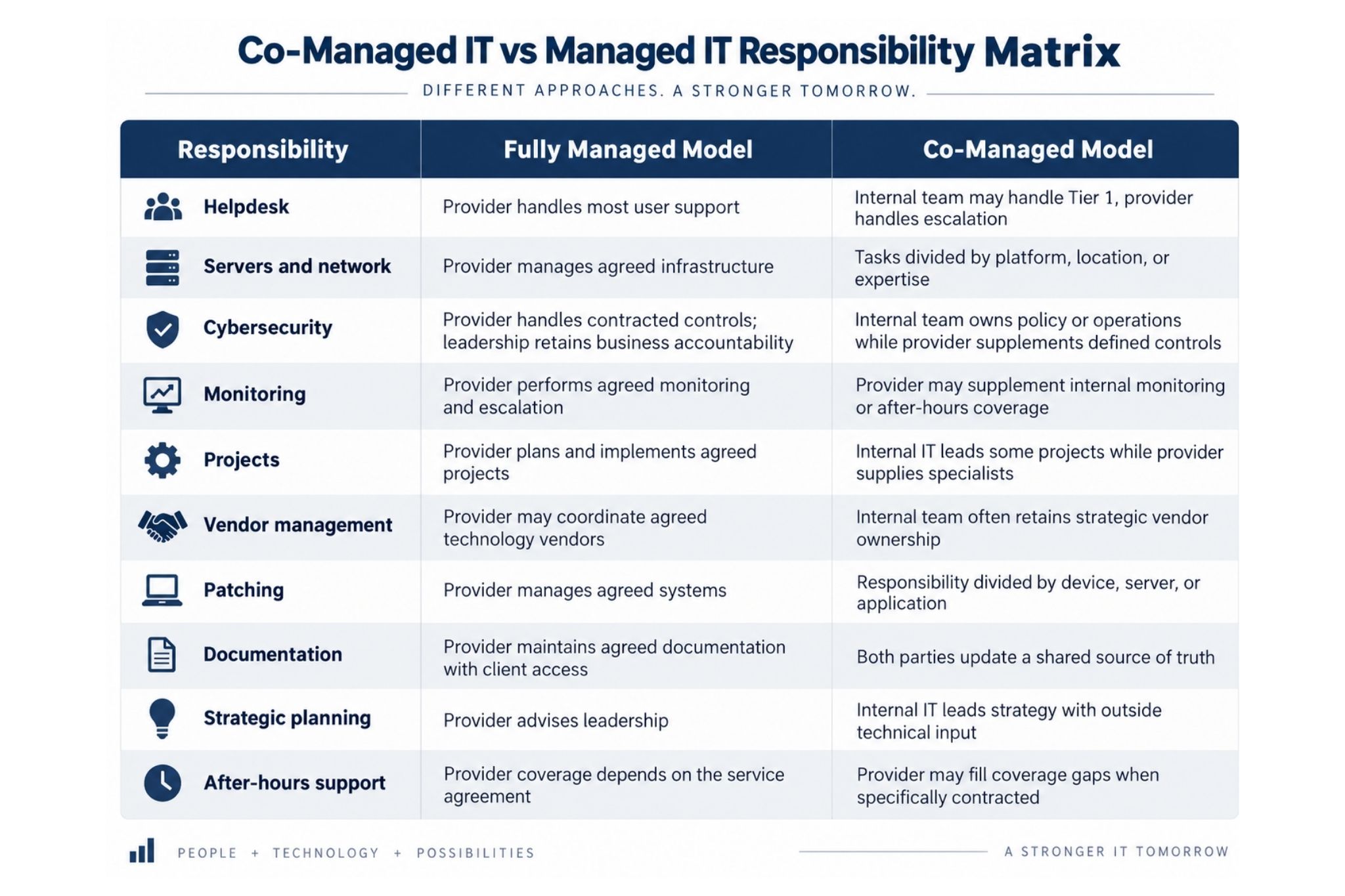
For example, LAComputech separately promotes 24/7 Helpdesk and technical support. Businesses should still confirm exactly which users, systems, hours, and escalation scenarios are included in their particular agreement rather than assuming every managed plan has identical coverage.
If your internal IT team is spending most of its time clearing tickets, monitoring routine issues, and reacting to maintenance instead of working on business priorities, LAComputech can help evaluate which responsibilities should remain internal and which could be supplemented through managed IT support.
Scenario 1: Your Business Has No Internal IT Staff
For a company without dedicated technology personnel, fully managed IT is usually the simpler managed IT support model.
An office manager or executive should not become the default network administrator merely because nobody else owns IT.
A provider can become the primary operational resource while leadership retains control over business priorities, budgets, risk tolerance, and major purchasing decisions.
The important distinction is that outsourcing IT does not outsource executive accountability. Management should still know:
-
Who owns major systems and accounts
-
How incidents are escalated
-
What services are included
-
How changes are approved
-
Where documentation is stored
-
How performance is reviewed
Scenario 2: One IT Administrator Is Overloaded
This is often where co-managed IT vs managed IT becomes a more meaningful question.
One experienced administrator may understand the business extremely well but still lack the time to simultaneously handle tickets, server maintenance, security reviews, backups, projects, vendors, employee onboarding, and after-hours issues.
Co-management can allow that person to remain the internal technology owner while an external team handles agreed responsibilities.
A hypothetical Louisiana company might keep its administrator responsible for business applications and internal projects while using outside support for helpdesk escalation, remote monitoring, infrastructure work, or scheduled maintenance.
LAComputech also offers IT Security Services covering areas such as virtual technical support, backups and recovery, and operating-system security upgrades and patches. Any division between those services and internal staff should be documented in the agreement.
Scenario 3: A Mature IT Department Needs Specialist Coverage
A larger internal IT department may not need a provider to run everyday operations.
Instead, the business may need outside expertise for:
This is where IT staff augmentation can preserve internal ownership while adding resources only where they create value.
LAComputech's Managed IT page specifically notes that it can augment existing IT professionals rather than requiring businesses to replace them.
Clear Ownership Matters More Than the Label
The biggest weakness in poorly designed managed IT support models is ambiguity.
Consider patching. If the internal administrator believes the provider is patching a server while the provider believes that server is excluded from scope, the technology is unmanaged regardless of what the contract calls itself.
The same issue applies to:
-
Backups
-
Firewall changes
-
Administrator accounts
-
Monitoring alerts
-
Employee onboarding
-
Security incidents
-
Vendor renewals
-
Documentation
-
Weekend emergencies
CISA's guidance for MSP customers recommends defining expected provider privilege levels, reviewing connections between the MSP and internal systems, and limiting access to what is necessary. CISA's Risk Considerations for Managed Service Provider Customers provides a useful reference when documenting these boundaries.
Microsoft applies the same least-privilege principle to Microsoft 365 administration. Its current Microsoft 365 administrator role guidance recommends assigning administrators only the permissions needed for their responsibilities and limiting highly privileged Global Administrator accounts.
Questions to Ask Before Choosing a Support Model
Use these questions when comparing outsourced IT vs internal IT or a hybrid arrangement:
-
Who handles everyday employee support?
-
Who owns servers, networks, cloud environments, and backups?
-
Who monitors systems after normal business hours?
-
Who approves and deploys patches?
-
Who owns cybersecurity policies versus technical controls?
-
Who handles Microsoft 365 and privileged accounts?
-
Who coordinates third-party technology vendors?
-
Who maintains documentation?
-
What problems stay with internal IT?
-
What problems automatically escalate to the provider?
-
Who leads major projects?
-
What reports does management receive?
-
What happens when the primary internal administrator is unavailable?
If any answer is "we thought the other team handled that," the model needs clearer ownership.
Choose the Model That Solves the Staffing Problem
The co-managed IT vs managed IT choice should follow the organization's actual staffing, workload, risk, and technical needs.
Businesses without IT staff may benefit from fully managed IT services that centralize everyday technology responsibility. Organizations with capable but overloaded staff may benefit from co-managed IT services that provide additional coverage without removing internal control. Mature IT departments may use outside specialists selectively for projects, infrastructure, or coverage gaps.
LAComputech's current services include managed IT, remote monitoring, virtual technical support, server management, infrastructure consulting, IT security, and staff augmentation for organizations that already have internal professionals.
Call LAComputech at (855) 252-8324 to discuss your current IT team, support workload, escalation needs, and whether a fully managed or co-managed approach makes operational sense for your organization. The phone number is confirmed on LAComputech's current Contact page.
FAQs
What is the difference between co-managed IT and fully managed IT?
Fully managed IT places most contracted day-to-day technology responsibilities with an external provider. Co-managed IT divides those responsibilities between internal IT staff and an outside provider according to a documented scope.
Is co-managed IT the same as IT staff augmentation?
They overlap, but they are not always identical. IT staff augmentation can simply add technical capacity. Co-managed IT generally works best when responsibilities, systems, escalation procedures, access, and reporting are formally divided between internal and external teams.
When do co-managed IT services make sense?
They can make sense when a business already has capable internal IT staff but needs additional help with support volume, monitoring, projects, specialist expertise, infrastructure, maintenance, or coverage outside the internal team's capacity.
Can an MSP work alongside an internal IT department?
Yes. LAComputech's current Managed IT page specifically states that it can provide IT staff to augment technology professionals already in place. The exact duties should be defined in the service agreement.