Prevent Printer Problems Before They Disrupt Work
Printer failures often begin with preventable conditions such as paper dust, dirty rollers, low supplies, outdated drivers, missed firmware updates, poor ventilation, and improperly stored paper. A structured office printer maintenance checklist helps decision-makers reduce repair costs, protect productivity, and keep essential document workflows available.
For healthcare providers, schools, regulated businesses, and public agencies worldwide, printer reliability affects service delivery and risk. LAComputech combines remote monitoring, supply management, preventive service, and security oversight across an entire fleet.
Office Printer Maintenance Checklist at a Glance
Use this printer maintenance schedule as a starting point, then adjust it for manufacturer guidance, device age, volume, and operating conditions.
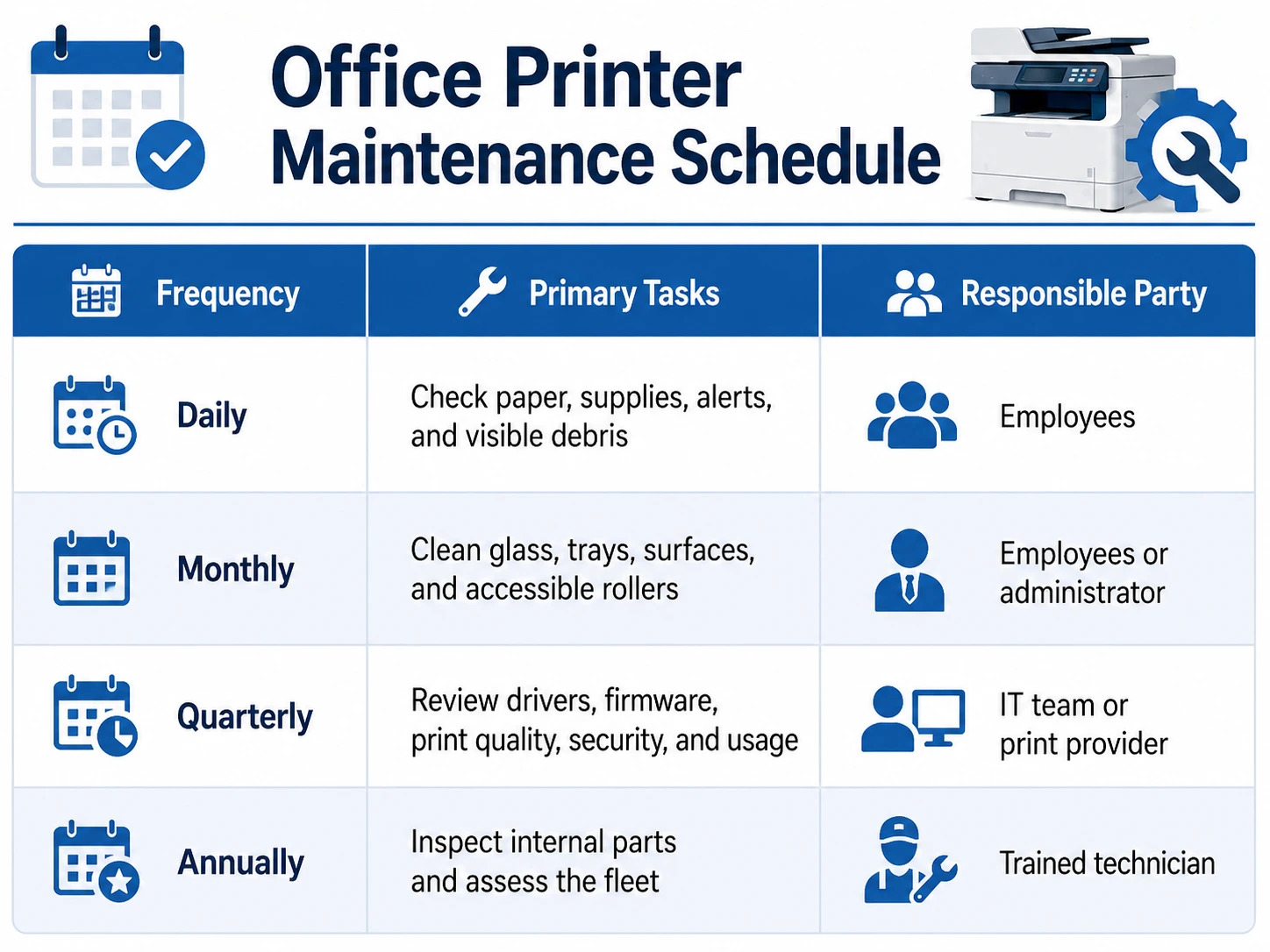
High-volume multifunction devices may need commercial printer maintenance more often than lightly used departmental printers.
Daily Office Printer Maintenance Tasks
Check Paper Trays and Paper Quality
Keep tray guides aligned, avoid overfilling, and remove bent, damp, torn, or curled sheets. Use approved paper and store unopened packages in a dry area.
Review Supplies and Alerts
Check consumables before they reach critical levels. Record repeated error codes instead of continually restarting the printer. One of the most useful office printer maintenance tips is to treat recurring alerts as early warnings.
Keep the Printer Area Clear
Remove loose paper and objects blocking ventilation. Keep drinks, plants, boxes, and heavy supplies off the device.
Monthly Printer Cleaning and Inspection
Clean Accessible Surfaces
Follow shutdown instructions. Use a soft, lint-free cloth, never spray liquid directly onto the device, and clean both scanner-glass areas to prevent lines on scans and copies.
Inspect Trays and Feed Areas
Remove paper fragments and dust, confirm tray guides move correctly, and clean only accessible rollers identified in the manual. HP’s manufacturer instructions for cleaning printer rollers recommend removing visible lint or dust with appropriate materials and following the model-specific procedure.
Print a Test Page
Look for streaks, fading, smudges, incorrect colors, repeated marks, and misalignment. Record the result for comparison. This monthly printer preventive maintenance step helps identify developing problems.
Quarterly Printer Maintenance Checklist
Review Drivers and Firmware
Confirm driver compatibility. Microsoft identifies Windows Update as a preferred method for obtaining current printer drivers. Review how to install the latest printer drivers.
Check firmware versions, test updates before broad deployment, and document changes. CISA explains that patches address performance issues and vulnerabilities, making software and firmware updates part of business risk management.
In June 2025, Rapid7 disclosed eight vulnerabilities affecting hundreds of Brother printer, scanner, and label-maker models, plus devices from other manufacturers. One weakness could allow generation of a default administrator password from a device serial number. Review the multifunction printer vulnerability findings and LAComputech’s guidance on why printer firmware updates matter.
Review Performance and Security
Compare test pages, repeated jams, slow queues, connection failures, and workloads. Confirm administrator access, remove obsolete connections, and review secure-print settings. Quarterly commercial printer maintenance should address mechanical condition, software health, and network exposure.
Annual Professional Printer Maintenance
A technician should inspect fusers, transfer belts, imaging units, internal rollers, maintenance kits, waste-toner systems, electrical components, and high-temperature areas.
Worn parts can cause jams, wrinkled pages, uneven toner, repeated marks, slow output, and rising service calls. Planned replacement is less disruptive than failure.
Leadership should review device age, volume, repair history, supply use, energy, security, cost per page, and manufacturer support. Decide whether to repair, reassign, upgrade, standardize, or retire each device. LAComputech explains how standardizing a business printer fleet can simplify maintenance, purchasing, support, and security.
Which Tasks Can Employees Perform?
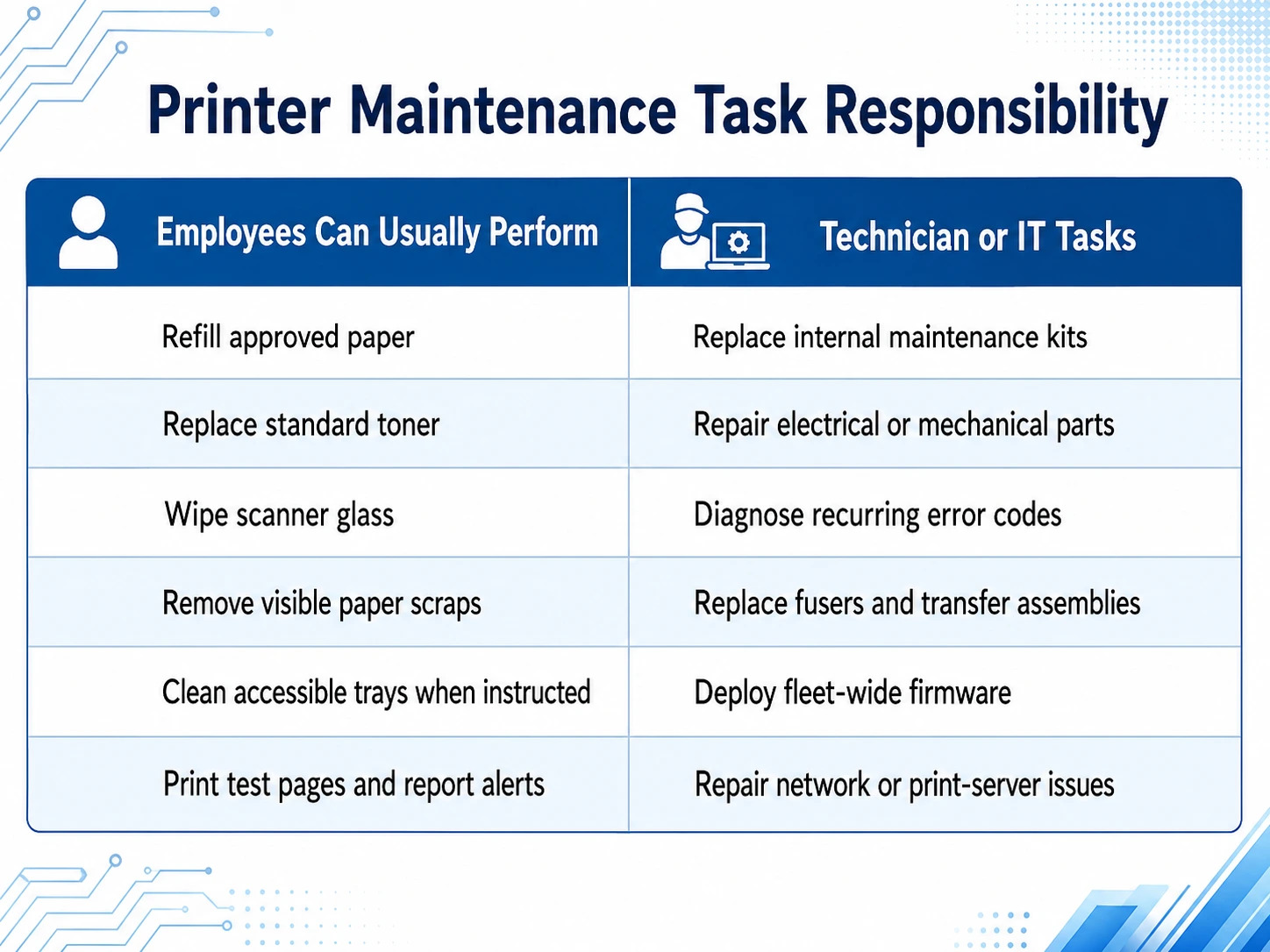
Employees should follow the manual, power down equipment when instructed, and never force jammed paper or remove fixed panels. Hot, electrical, and unfamiliar parts require trained support. These office printer maintenance tips prevent injury and larger repairs.
How Remote Monitoring Prevents Downtime
Remote monitoring makes printer preventive maintenance data-informed. It provides supply alerts, meter readings, device status, error notifications, volume trends, and visibility across locations.
Consider a multi-campus school system. Without central oversight, one campus may overuse an aging printer while another has unused capacity. Fleet reporting can rebalance usage, trigger supplies, and schedule service before feed errors interrupt workflows.
Remote monitoring does not replace physical service. It helps technicians diagnose problems and bring the correct parts. LAComputech’s Managed Print Services include proactive monitoring, automated supply replenishment, maintenance, and fleet optimization for organizations worldwide.
Is your team spending too much time responding to printer problems? Schedule a print environment assessment with LAComputech and build a practical printer maintenance schedule around actual fleet usage.
Why Businesses Need a Fleet-Wide Strategy
Reactive support begins after failure. Supplies arrive late, procedures differ, records remain incomplete, and IT teams repeat basic troubleshooting.
A managed strategy centralizes business printer maintenance through monitoring, earlier supply replenishment, fault tracking, and usage-based decisions. This matters for healthcare, education, government, and regulated organizations worldwide, where printing delays can interrupt patient intake, classroom administration, citizen services, billing, or compliance workflows.
An office printer maintenance checklist should therefore support a fleet policy, not remain an isolated cleaning list. Effective commercial printer maintenance connects maintenance, supplies, security, user support, budgeting, and lifecycle planning.
Build a More Reliable Print Environment
Daily checks, monthly cleaning, quarterly reviews, and annual inspections create a dependable foundation. Multi-device organizations also need centralized records, remote monitoring, consistent standards, and professional printer preventive maintenance.
LAComputech helps organizations worldwide reduce downtime, simplify fleet administration, strengthen device security, and improve cost visibility. Contact LAComputech to request a print environment assessment and turn this office printer maintenance checklist into a managed program built around your requirements.
Frequently Asked Questions
How often should office printers be maintained?
Perform basic checks daily, cleaning monthly, software reviews quarterly, and a professional inspection annually. High-volume devices may need more frequent service.
What does business printer maintenance include?
It includes supply checks, cleaning, test pages, software management, component inspections, error tracking, security reviews, monitoring, and replacement planning.
Can employees clean printer rollers?
Employees may clean accessible rollers only when manufacturer instructions permit it. Internal rollers, fusers, transfer parts, and electrical areas should be handled by trained technicians.
How do Managed Print Services reduce emergency repairs?
Monitoring, device alerts, usage data, service records, and scheduled maintenance help identify developing problems before they cause complete failure.