Build HIPAA Readiness Around the Technology That Handles ePHI
Medical practices depend on electronic health records, workstations, email, cloud applications, imaging systems, printers, mobile devices, networks, and third-party platforms. Each system that creates, receives, maintains, or transmits electronic protected health information, or ePHI, can affect the practice's security responsibilities. A practical HIPAA IT compliance checklist helps leadership identify where ePHI exists, which safeguards are in place, and where technology or documentation gaps require attention.
LAComputech supports Louisiana organizations through managed IT, cybersecurity, infrastructure, technical support, and other business technology services. Its current website also identifies HIPAA/HITECH compliance among its areas of expertise. Technology services can support a healthcare organization's compliance program, but no IT provider or security product alone makes a medical practice HIPAA compliant.
As of August 2026, HHS states that the HIPAA Security Rule currently in effect remains the applicable rule, while the cybersecurity modifications announced in December 2024 remain a proposed rule. Practices should distinguish current legal requirements from controls that may appear in proposed regulations or cybersecurity best practices.
1. Inventory Technology and Map Where ePHI Goes
Any HIPAA IT compliance checklist should begin with scope. A practice cannot adequately evaluate risk if it does not know where ePHI resides.
Create and maintain an inventory covering relevant:
-
Workstations, laptops, servers, mobile devices, printers, and network equipment
-
EHR, billing, imaging, email, patient portal, backup, and cloud platforms
-
Remote-access systems and externally hosted services
-
Vendors or contractors that create, receive, maintain, or transmit ePHI
Then map how ePHI moves between these systems. HHS risk-analysis guidance specifically directs organizations to identify all ePHI they create, receive, maintain, or transmit and to consider external sources such as vendors and consultants.
This exercise often reveals forgotten systems, old accounts, unmanaged devices, cloud applications, or workflows that were never included in previous security planning.
2. Complete a Documented HIPAA Risk Assessment
A HIPAA risk assessment is not simply a vulnerability scan or software report. HHS describes risk analysis as foundational to the Security Rule and requires an accurate and thorough assessment of risks and vulnerabilities affecting the confidentiality, integrity, and availability of ePHI.
For each meaningful risk, document:
-
The affected system or information
-
The threat and vulnerability
-
Existing safeguards
-
Likelihood and potential impact
-
Additional measures that may be reasonable and appropriate
-
Who owns the corrective action
-
Target dates and evidence of completion
The HHS guidance on HIPAA risk analysis and NIST SP 800-66 Rev. 2 provide useful frameworks for building this process. NIST's publication is guidance rather than a substitute for the HIPAA regulations.
3. Review User Accounts, Authentication, and Access
Access should reflect job responsibilities. Shared logins make accountability difficult, while outdated accounts can leave unnecessary paths into systems containing patient information.
Review whether the practice:
-
Uses individual user accounts
-
Assigns access based on job responsibilities
-
Removes or changes access when employees leave or change roles
-
Protects administrator and remote-access accounts
-
Periodically reviews who can access systems containing ePHI
The current Security Rule requires access controls and procedures for verifying that people seeking access are who they claim to be.
Where MFA Fits
Multi-factor authentication is an important part of a modern healthcare cybersecurity checklist, but practices should describe it accurately. The current rule does not establish one universal MFA requirement for every system.
However, OCR's January 2026 cybersecurity guidance explains that a regulated entity's risk analysis may determine that MFA is necessary to reduce unauthorized-access risk for particular systems. That makes MFA especially important to evaluate for cloud applications, email, remote access, privileged accounts, and other high-risk access paths.
If your practice has not reviewed its user accounts, patch status, endpoint protections, backups, and remote-access controls recently, LAComputech can help evaluate the technology environment and identify areas that may need additional technical attention.
4. Check Patching, Endpoint Protection, Encryption, and Logs
A useful HIPAA Security Rule checklist should evaluate more than the EHR.
Operating systems, browsers, applications, security software, printers, and network equipment also need appropriate maintenance. OCR's 2026 guidance emphasizes patching known vulnerabilities and notes that access controls, encryption, audit controls, and authentication can intersect directly with Security Rule safeguards.
Review:
-
Operating-system and application patching
-
Endpoint security controls
-
Device and software security configurations
-
Encryption for stored or transmitted ePHI where reasonable and appropriate
-
Audit logging and regular review
-
Network and remote-access protections
Do not interpret an "addressable" Security Rule specification as simply optional. HHS explains that the organization must assess whether the specification is reasonable and appropriate and document its decision, including an appropriate alternative measure when applicable.
Practices needing help evaluating these controls can review LAComputech's IT security services and cybersecurity services.
5. Test Backups and Prepare for Security Incidents
Backups should be treated as part of operational resilience, not simply as extra storage.
HHS requires contingency procedures addressing backup, restoration of lost data, and continuation of critical processes during emergencies affecting systems containing ePHI. The Security Rule also requires procedures to identify, respond to, mitigate, and document security incidents.
A Louisiana medical practice should know:
-
What ePHI is backed up
-
How frequently backups occur
-
Whether restoration has actually been tested
-
Who can access backup systems
-
What happens if the EHR, server, network, or office becomes unavailable
-
Who coordinates a suspected cybersecurity incident
Practices examining broader backup strategy can also review LAComputech's existing article on cloud backup versus external hard drives.
6. Train Staff and Control Devices Throughout Their Lifecycle
Technology cannot compensate for missing procedures.
The current Security Rule requires security awareness and training for workforce members. Practices should cover access procedures, phishing, password and authentication practices, safe device use, handling of sensitive information, and how employees should report suspected incidents.
Hardware also needs controls through retirement. HHS requires policies governing electronic media containing ePHI, including its final disposition and removal of ePHI before media is reused.
That applies not only to computers and servers, but potentially to storage devices and multifunction printers that retain electronic information. LAComputech's managed print services for healthcare provide additional context for healthcare print security.
7. Review Vendors and Business Associate Agreements
EHR hosting, billing, cloud storage, IT support, data transmission, and similar services may involve business associates when the vendor creates, receives, maintains, or transmits PHI on behalf of the practice.
HHS specifically identifies cloud providers and IT contractors or managed service providers as potential business associates when their work involves ePHI. Appropriate Business Associate Agreements must be in place when required.
Use the HHS business associate guidance when reviewing these relationships.
When evaluating HIPAA-compliant IT services, ask what the provider actually manages, what evidence it can supply, whether a BAA is required, and which obligations remain with the medical practice.
What the Practice Owns vs. What Technology Vendors Handle
HIPAA security operates through shared responsibilities, but outsourcing technology does not outsource all accountability.
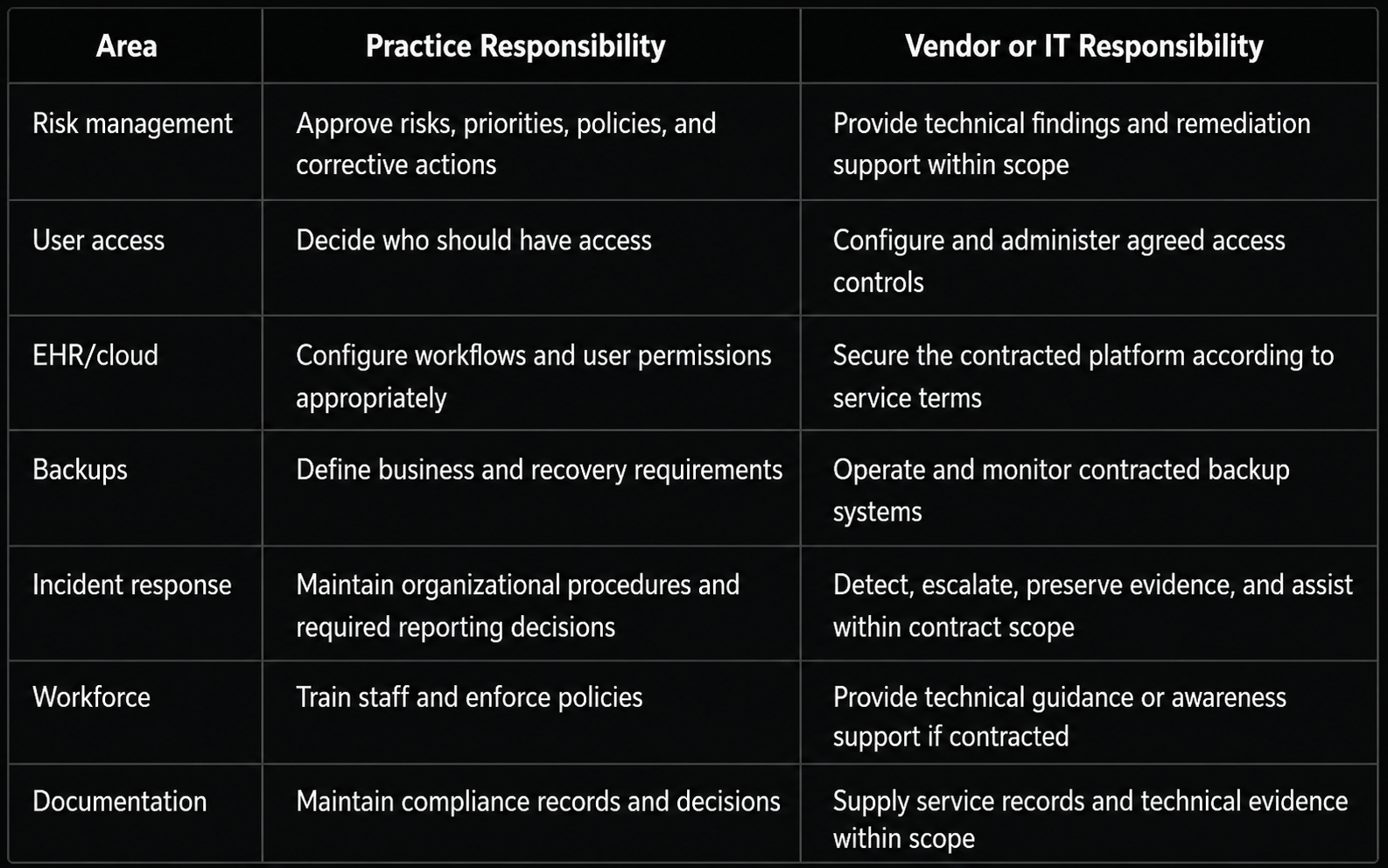
For broader technology planning, practices can also review LAComputech's managed IT services and systems and infrastructure consulting.
One-Page HIPAA IT Compliance Checklist
Use this condensed HIPAA IT compliance checklist during an internal review:
-
Inventory systems, applications, devices, printers, and vendors handling ePHI.
-
Map ePHI storage and data flows.
-
Complete and document the HIPAA risk assessment.
-
Maintain a risk remediation plan.
-
Use individual accounts and role-appropriate access.
-
Evaluate MFA based on documented risk.
-
Patch operating systems, software, security tools, and firmware.
-
Review endpoint protection, encryption, transmission security, and logging.
-
Back up ePHI and test restoration.
-
Maintain and test incident-response procedures.
-
Train workforce members on security responsibilities.
-
Review vendors and required BAAs.
-
Securely dispose of or sanitize devices and media.
-
Keep required policies, assessments, evaluations, and security documentation current.
HHS currently requires Security Rule documentation to be retained for six years after the later of its creation date or the date when it was last in effect.
Download the one-page HIPAA IT Compliance Checklist
Strengthen Your Healthcare IT Before a Review Exposes Gaps
A checklist is most useful when each item can be supported by current evidence. Mark each control as documented and current, partially implemented, outdated, or unknown. Unknown items deserve investigation rather than assumptions.
LAComputech's current website identifies managed IT, cybersecurity, infrastructure services, technical support, and HIPAA/HITECH expertise among its technology capabilities for Louisiana organizations. Technology controls can support a broader HIPAA compliance program involving people, policies, procedures, documentation, contracts, and risk management.
Call LAComputech at (855) 252-8324 to discuss your medical practice's IT environment, security priorities, and technology self-assessment and determine what improvements may be appropriate. The phone number was verified against LAComputech's current Contact page.
FAQs
What should be included in a HIPAA IT compliance checklist?
It should address ePHI inventory and data flows, risk analysis, access controls, authentication, patching, endpoint security, encryption decisions, audit controls, backups, incident response, workforce training, vendor relationships, device disposal, and documentation.
How often should a medical practice perform a HIPAA risk assessment?
HIPAA does not prescribe one universal annual schedule. HHS requires organizations to regularly reevaluate risks and reassess safeguards when environmental or operational changes warrant it.
Does HIPAA require multi-factor authentication?
The currently effective Security Rule does not impose one blanket MFA requirement across every system. OCR guidance states that an organization's risk analysis may determine MFA is necessary to reduce unauthorized-access risk in particular circumstances.
Can HIPAA-compliant IT services make a medical practice compliant?
No IT provider, platform, or security product alone establishes HIPAA compliance. A provider can support technical safeguards, monitoring, infrastructure, backups, security controls, and documentation within its contracted scope, while the practice remains responsible for its broader compliance program.