Printer Age Alone Should Not Determine Replacement
An older printer is not automatically a bad printer. If a device remains reliable, receives appropriate security support, handles its normal workload, and operates at a reasonable cost, replacing it simply because of age may create unnecessary expense. Knowing when to replace office printer equipment requires looking at performance, repairs, supplies, security, employee impact, and changing business requirements together.
For Louisiana organizations managing multiple printers or multifunction devices, LAComputech provides managed print and business technology services that can help evaluate equipment based on actual usage rather than assumptions. Its current Managed Print Services process includes assessing equipment and usage patterns, right-sizing fleets, repositioning equipment, and managing devices over time.
How to Know When to Replace Office Printer Equipment
The most useful signs your printer needs replacing usually appear as a pattern rather than one isolated problem.
1. Service Calls Keep Returning
One repair does not justify replacement. Repeated repairs for different components are more important.
Track:
-
Frequency of service calls
-
Parts replaced
-
Employee downtime during each failure
-
Whether the same fault keeps returning
-
Cost of service compared with the device's usefulness
-
Availability of replacement components
A repair can still make sense when the problem is isolated, parts are readily available, and the device otherwise performs reliably.
When failures become routine, the organization should compare the cost and disruption of continuing repairs with replacement or reassignment.
2. The Printer No Longer Matches Its Workload
Print volume changes as companies hire employees, add departments, consolidate offices, or digitize workflows.
An older desktop printer may become overloaded after a team doubles in size. At another location, a large copier may become underused because employees now scan and distribute documents electronically.
The office printer lifespan should therefore be considered in context. A lightly used device and an overloaded workgroup printer can age very differently.
Review several months of:
A mismatch between workload and device capacity can indicate that relocation or fleet consolidation is more appropriate than simply buying another printer.
Repair or Replace Office Printer Equipment?
Use a structured comparison before approving a new purchase.
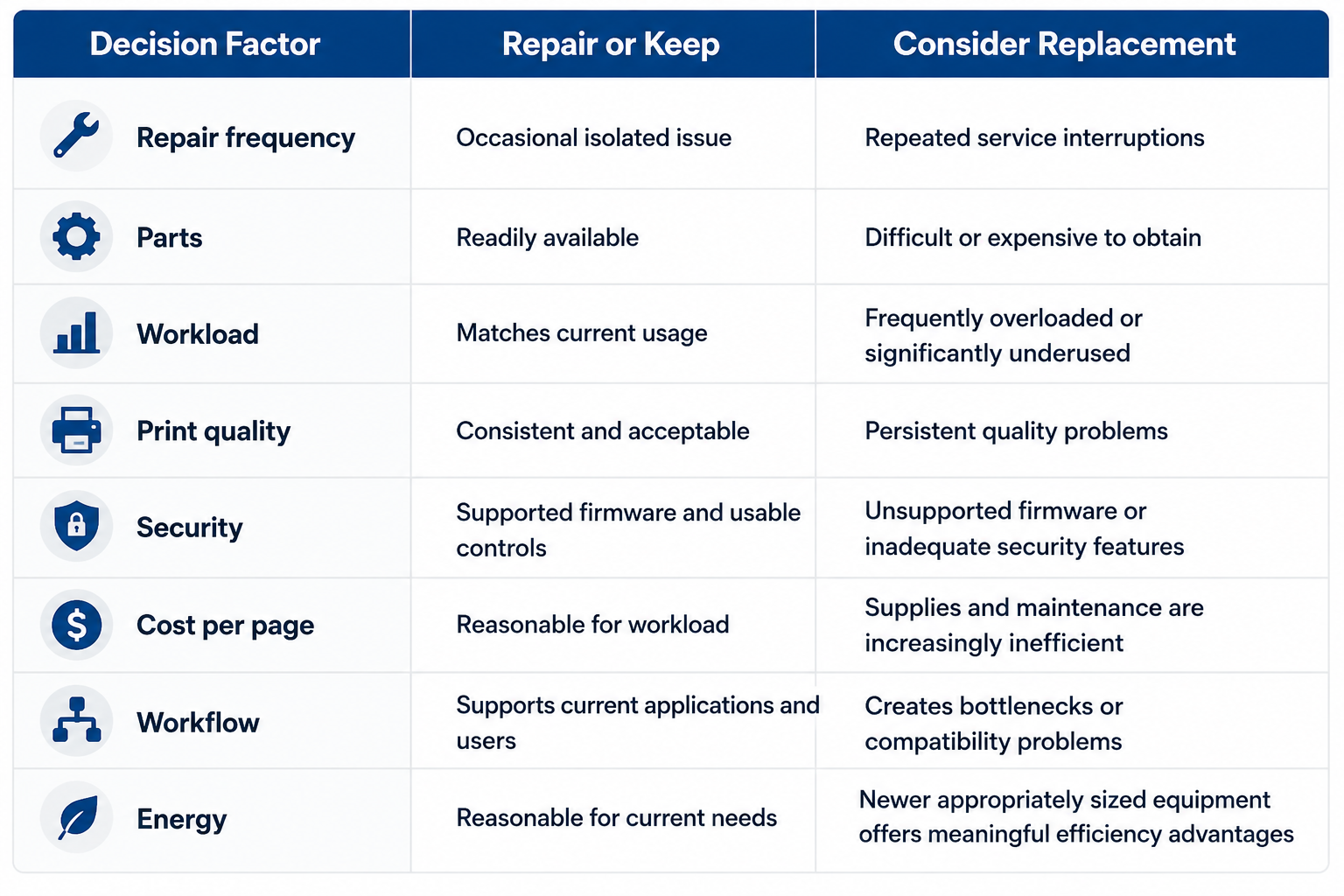
This repair or replace office printer worksheet is intended to support a business decision, not create an automatic replacement rule.
A printer with one expensive repair may still be worth keeping. A device with inexpensive repairs every few weeks may create a larger operational problem because employees repeatedly lose access to an important workflow.
Security Support Can Become a Replacement Issue
Modern printers and multifunction devices are networked technology. NIST's guidance for replication devices specifically covers printers, copiers, scanners, and multifunction devices and addresses the confidentiality, integrity, and availability of information processed, stored, or transmitted through them. Review NIST's replication-device guidance.
Security should therefore be part of the copier replacement checklist.
Review whether the manufacturer still provides:
-
Firmware updates
-
Security advisories
-
Supported network protocols
-
Administrative security controls
-
Authentication features
-
Secure storage or data-erasure capabilities where needed
LAComputech's office printer security guide also recommends inventorying devices, tracking firmware and support status, and considering retirement when equipment can no longer be securely maintained.
If your organization has several aging printers with unclear repair histories, firmware status, and usage levels, LAComputech's managed print services can help assess which devices should remain, move, be consolidated, or be considered for replacement.
Consider Stored Data Before Retiring a Copier
Replacement creates another responsibility: securely retiring the old equipment.
The Federal Trade Commission notes that digital copiers can contain hard drives that store information from documents they copy, print, scan, fax, or email. Businesses should plan for data protection throughout the copier lifecycle, including when a leased unit is returned or an owned device is disposed of. Review the FTC's digital copier data security guidance.
Before equipment leaves organizational control, determine:
-
Whether internal storage contains business data
-
How credentials and stored jobs will be removed
-
Whether secure erasure is supported
-
Who is responsible for sanitization
-
What the lease or disposal agreement requires
These considerations are especially important when determining when to upgrade an office copier used for confidential documents.
Energy Efficiency Matters, but It Is Not the Only Reason to Upgrade
Energy consumption can be included in a replacement analysis, particularly when an organization operates many devices.
ENERGY STAR recommends selecting printers, copiers, and scanners around actual requirements and projected growth. Its current guidance also notes that certified imaging equipment is designed around energy-efficiency and power-management criteria. Review ENERGY STAR imaging equipment guidance.
Do not replace a productive printer solely because another model uses less power. Compare energy use alongside maintenance, supplies, utilization, security, and productivity.
A Print Assessment Can Prevent the Wrong Replacement
A common mistake is assuming a failing printer must be replaced with another printer in exactly the same location.
A fleet assessment may reveal that the better decision is to:
-
Move an underused device to the affected department
-
Consolidate several small printers into one workgroup MFP
-
Keep a reliable older printer in a lower-volume role
-
Replace an overloaded machine with equipment sized for the workload
-
Standardize several models to simplify support and supplies
LAComputech's current Managed Print Services page describes an assessment process that reviews equipment, usage patterns, and spending before right-sizing the fleet. The company also offers multifunction printer leasing through its hardware and software solutions.
Consider a Louisiana professional services company with eight printers.
One high-volume workgroup printer receives repeated repairs, while two nearby devices are barely used. The company could simply replace the failing unit, but doing so would preserve the same inefficient layout.
A print assessment might instead show that one underused machine can be relocated, another device can be retired, and the high-volume location needs a more appropriately sized multifunction printer.
The objective is not replacing old equipment. It is creating a fleet that better matches employee workflows.
Copier Replacement Checklist for Lifecycle Reviews
Decision-makers can use these questions during an annual or semiannual equipment review:
-
How many service incidents occurred during the review period?
-
How much employee downtime did those incidents create?
-
Is the printer's current volume appropriate for its intended workload?
-
Are supplies and parts readily available?
-
Does the manufacturer still provide firmware and security support?
-
Is print quality consistently acceptable?
-
Does the device support current operating systems and workflows?
-
Are employees regularly waiting for the device?
-
Is another nearby printer significantly underused?
-
Would consolidation or relocation solve the problem without purchasing equipment?
-
Does the device still meet security requirements?
-
Has energy consumption become a meaningful operating concern?
-
Would replacement simplify supplies, drivers, or technical support?
Using the same copier replacement checklist across a fleet makes purchasing decisions easier to compare.
Make Replacement a Business Decision, Not an Age Decision
There is no universal office printer lifespan that determines when every device must be retired. The better question is whether the equipment continues to support the organization reliably, securely, and economically.
Knowing when to replace office printer equipment means considering repair frequency, workload, parts, security support, print quality, operating cost, employee disruption, and the surrounding fleet. In some cases, repair is appropriate. In others, reassignment, consolidation, leasing, or replacement may offer better value.
LAComputech helps Louisiana organizations evaluate printer fleets, usage patterns, device placement, maintenance requirements, and managed print options around actual business needs. Call LAComputech at (855) 252-8324 to discuss your current print environment and determine whether repair, relocation, consolidation, or replacement makes sense for your organization. The current Contact page lists the same main number.
FAQs
When should a business replace an office printer?
A business should consider replacement when recurring repairs, unsupported firmware, unavailable parts, inadequate security, poor print quality, excessive downtime, or changing workload make continued operation less practical. Age by itself is not enough.
What are the main signs your printer needs replacing?
Common signs your printer needs replacing include repeated service calls, persistent print-quality issues, declining reliability, unavailable parts, security-support limitations, and a workload that no longer matches the device.
Is it better to repair or replace an office printer?
The repair or replace office printer decision should compare repair history, expected continued use, parts availability, security support, employee downtime, supply costs, and workload. A single repair may be worthwhile, while recurring problems may justify replacement.
When should you upgrade an office copier?
Determining when to upgrade an office copier requires reviewing volume, scanning and finishing needs, security features, firmware support, maintenance history, energy use, employee workflows, and whether other devices in the fleet could absorb the workload.