Recurring Network Problems May Be a Design Problem
If employees keep reporting weak Wi-Fi, slow cloud applications, dropped calls, or unreliable connectivity, replacing the device closest to the complaint may not solve the real problem.
A business network upgrade should begin when recurring symptoms suggest the current infrastructure no longer supports how the organization operates. That does not automatically mean replacing every switch, firewall, access point, or cable. It means evaluating the network as a connected system before deciding what actually needs to change.
For Louisiana organizations experiencing these problems, LAComputech currently provides network-related services through its Systems & Infrastructure Services Consulting offering, including network solutions, internet optimization, wireless setup, and cabling setup and testing.
Signs It May Be Time to Evaluate Your Network
Network problems rarely announce themselves as one clear infrastructure failure. Employees usually notice the operational symptoms first.
Wi-Fi Has Dead Zones or Repeatedly Drops Connections
A business Wi-Fi upgrade may deserve consideration when employees regularly move between areas with inconsistent connectivity, meeting rooms struggle with wireless access, or certain parts of the office perform differently from others.
The answer is not necessarily another access point.
Wireless performance depends on factors such as coverage, device demand, building layout, radio conditions, access-point placement, and the capacity available to connected devices. Cisco's current wireless design guidance emphasizes requirement analysis, expected device counts, capacity, and radio design rather than selecting access-point quantities in isolation. Review Cisco's wireless design guidance Cisco
Cloud Applications Slow Down During Busy Periods
If Microsoft 365, hosted applications, cloud storage, or other internet-dependent systems become noticeably slower when more employees are working, investigate the entire path before assuming the internet plan is the only problem.
Possible areas to evaluate include wireless capacity, switching, internal traffic patterns, internet connectivity, network configuration, and the application or service itself.
Increasing internet speed will not correct every internal network bottleneck.
Voice and Video Problems Keep Returning
Recurring VoIP or video-call problems can indicate that the network is struggling with the demands placed on it.
One isolated bad call may not justify an infrastructure project. A pattern affecting multiple users, rooms, or busy periods deserves deeper evaluation.
The Office Has Grown Without Redesigning the Network
Adding employees, laptops, phones, printers, cameras, wireless devices, conference rooms, and cloud applications changes what the network must support.
An office network originally designed around a smaller workforce may become increasingly difficult to manage after years of incremental expansion.
LAComputech's existing Office Move IT Checklist for Growing Businesses also highlights the importance of planning wireless coverage, switching, firewall requirements, cabling, internet connectivity, and device locations around the way employees actually use a workspace.
Network Equipment Is Becoming a Bottleneck
A firewall upgrade, switch upgrade, or network cabling upgrade may be appropriate when existing components cannot support current operational requirements.
But age alone should not determine replacement.
A proper review should consider current condition, support status, capacity, configuration, compatibility, security requirements, workload, and future business needs before equipment is replaced.
LAComputech's current Hardware & Software Sales service lists switches and firewalls among its business technology offerings.
Symptoms Should Lead to Evaluation, Not Automatic Replacement
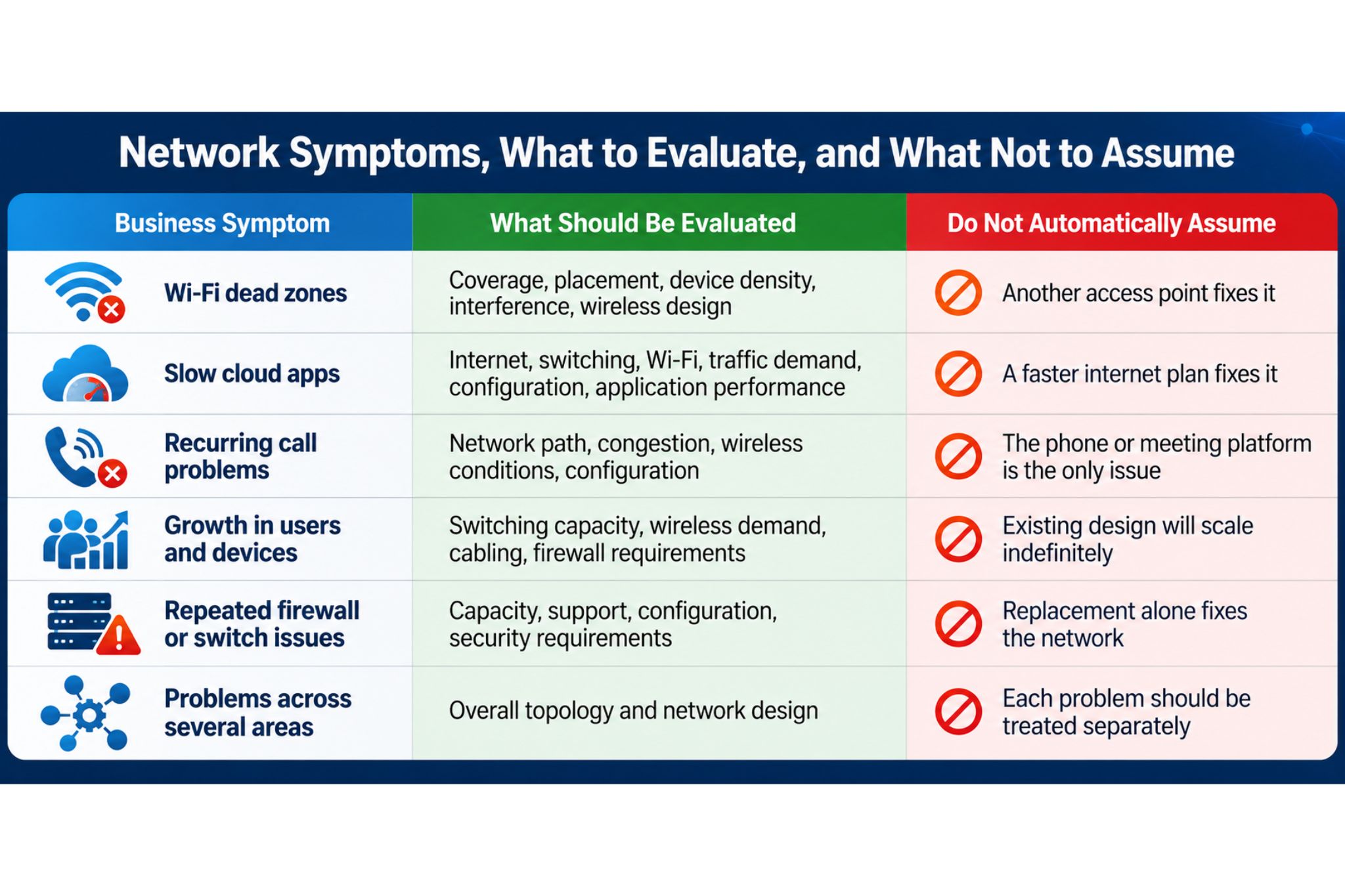
When several of these symptoms occur together, individual repairs can become a cycle of treating symptoms instead of determining whether the underlying design still fits the business.
If your organization is repeatedly addressing Wi-Fi, connectivity, switching, firewall, or cabling problems one at a time, LAComputech can evaluate the broader network environment and help determine whether targeted corrections or a larger infrastructure upgrade makes more sense.
What Should an Infrastructure Consultant Evaluate First?
A network infrastructure upgrade should start with requirements and evidence, not a shopping list.
How Employees and Applications Use the Network
The assessment should identify what the business actually depends on, including:
-
Number and types of users and devices
-
Business-critical applications
-
Cloud services
-
Voice and video communications
-
Wired and wireless requirements
-
Shared equipment
-
Remote-access requirements
-
High-demand rooms or departments
-
Expected business growth
Existing Network Design
The consultant should understand how the network is currently arranged, including switches, firewall, wireless access points, cabling, internet connectivity, and relevant network segments.
Cisco's campus network guidance emphasizes designing networks that can scale with organizational demand rather than considering individual components without the wider architecture. Review Cisco's campus LAN and wireless design guidance Cisco
Wireless Coverage and Capacity
Coverage answers whether a signal reaches an area.
Capacity asks whether that wireless environment can support the devices and activity using it.
Those are different questions.
A conference room might show a strong signal while still delivering inconsistent performance when many devices become active at the same time.
Switches, Uplinks, Firewalls, and Internet Connectivity
A consultant should determine whether the current infrastructure supports today's traffic patterns and business requirements.
The goal is to find the actual constraint before recommending faster or newer hardware.
Cabling
Network cabling is easy to overlook because much of it is hidden inside walls and ceilings.
An assessment should consider whether existing cabling is properly installed, tested, documented, located where devices are needed, and suitable for the network design being planned.
Security and Network-Device Management
Infrastructure changes also affect security.
CISA recommends maintaining current inventories of network devices and firmware, reviewing configuration changes, and monitoring infrastructure such as switches, routers, and firewalls. Review CISA's network infrastructure guidance
NIST's enterprise network guidance also emphasizes that modern networks must account for changing architectures, cloud services, distributed resources, network configurations, and security controls. Review NIST SP 800-215 NIST Computer Security Resource Center
Why Faster Wi-Fi or a New Firewall May Not Solve the Problem
Equipment is part of the network, but the equipment is not the network design.
Consider a business with poor conference-room Wi-Fi.
Adding another access point sounds reasonable. But if the actual issue involves placement, competing wireless coverage, device density, cabling, switching, or configuration, another access point may simply add another variable.
The same applies to a firewall.
Replacing a firewall may be appropriate when capacity, support, compatibility, or security requirements justify it. But a new firewall does not automatically solve an internal switching problem, bad cabling, poor wireless coverage, or an internet-service issue.
The right question is:
What problem are we trying to solve, and where in the network is that problem actually occurring?
A Growing Louisiana Office
Consider a Louisiana professional-services company that gradually expands its office and workforce.
More employees are added. Conference rooms become busier. Additional wireless devices, printers, phones, and cloud applications are introduced.
Over time, employees begin reporting weak Wi-Fi in one part of the building, inconsistent video calls, and slower application performance during busy periods.
The company addresses each complaint individually.
One access point is added. A device is replaced. Internet service is changed. The problems improve temporarily but continue returning.
A broader infrastructure assessment would instead review how the office has changed, where employees and devices are located, how wireless coverage is designed, how switches and the firewall are being used, whether cabling matches the current layout, and where actual performance constraints appear.
The result of that assessment might be replacement, reconfiguration, relocation, cabling changes, or a combination of improvements.
The important point is that the recommendation follows the diagnosis.
Plan the Upgrade Around Business Requirements
Before approving a network infrastructure project, decision-makers should be able to answer:
-
What specific problems are we trying to correct?
-
Which users, locations, and workflows are affected?
-
What evidence points to the underlying cause?
-
Which existing components can remain?
-
Which components actually need upgrading?
-
Does the design support expected growth?
-
How will changes be tested?
-
What must remain operational during implementation?
-
Who will document the finished network?
A strong business network upgrade should leave the organization with an environment designed around current operations and realistic future requirements, not simply newer equipment.
Plan Your Next Network Infrastructure Upgrade With Confidence
Recurring Wi-Fi problems, slow applications, call quality issues, overloaded network equipment, and years of office growth can all be signals that the network deserves a broader review.
LAComputech's Systems & Infrastructure Services Consulting offering includes network solutions, internet optimization, wireless setup, and cabling setup and testing. Its current hardware offering also includes switches and firewalls. Louisiana Computech
If your Louisiana business is considering an office network upgrade, firewall upgrade, business Wi-Fi upgrade, or broader infrastructure project, call LAComputech at (855) 252-8324 or use the LAComputech Contact page to describe the problems you are experiencing and discuss what should be evaluated before equipment is replaced. The current Contact page lists the same main phone number.
FAQs
How do I know when my business network needs an upgrade?
Recurring Wi-Fi problems, slow cloud applications, dropped connectivity, call issues, capacity constraints, and repeated network-related support problems can justify an infrastructure review. An assessment should identify the cause before determining what needs replacement.
Will adding faster Wi-Fi fix network dead zones?
Not necessarily. Wireless problems can involve coverage, placement, device demand, interference, cabling, switching, or configuration. The wireless environment should be evaluated before additional access points are installed.
When should a business replace its firewall or switches?
Replacement should be based on factors such as condition, support status, capacity, compatibility, security needs, workload, and current business requirements rather than age alone.
What should be evaluated before a network infrastructure upgrade?
Review user and application requirements, current topology, wireless coverage and capacity, switches, firewall, internet connectivity, cabling, security requirements, growth plans, implementation risks, and testing requirements.