When Everyday IT Support Starts Consuming the Workday
If your office manager, business owner, or senior IT employee keeps getting pulled away from their actual job to reset passwords, troubleshoot applications, or fix employee devices, the support model may be the problem.
An outsourced IT helpdesk can give employees a defined place to request technical assistance while reducing the number of routine issues that land on managers or higher-level IT staff. For Louisiana businesses evaluating that approach, LAComputech currently offers virtual technical support through its Support-24/7 Helpdesk as well as broader Managed IT Services.
The decision is not simply whether to outsource IT. It is whether employee support has become frequent, disruptive, or specialized enough that a structured helpdesk would operate more effectively than informal troubleshooting.
What an Outsourced IT Helpdesk Actually Does
An outsourced helpdesk focuses primarily on user-facing technical problems.
Depending on the agreed scope, that can involve issues such as:
-
Login and account problems
-
Application troubleshooting
-
Desktop and laptop issues
-
Printer connectivity
-
Basic network-access problems
-
Software questions
-
Remote troubleshooting
-
Ticket intake and prioritization
-
Escalation when a problem requires deeper technical work
LAComputech's current Support 24/7 Helpdesk service page describes virtual technical support and customizable outsourced IT support arrangements.
Remote support can resolve many user-level problems without a technician physically visiting the office. Microsoft's official Quick Assist documentation, for example, describes how authorized support personnel can remotely view a user's device and, with permission, take control to troubleshoot problems. Microsoft Quick Assist documentation
That does not mean every problem belongs at the helpdesk. A useful support model also defines when the ticket needs to move beyond first-line troubleshooting.
Three Ways Businesses Handle Employee IT Support
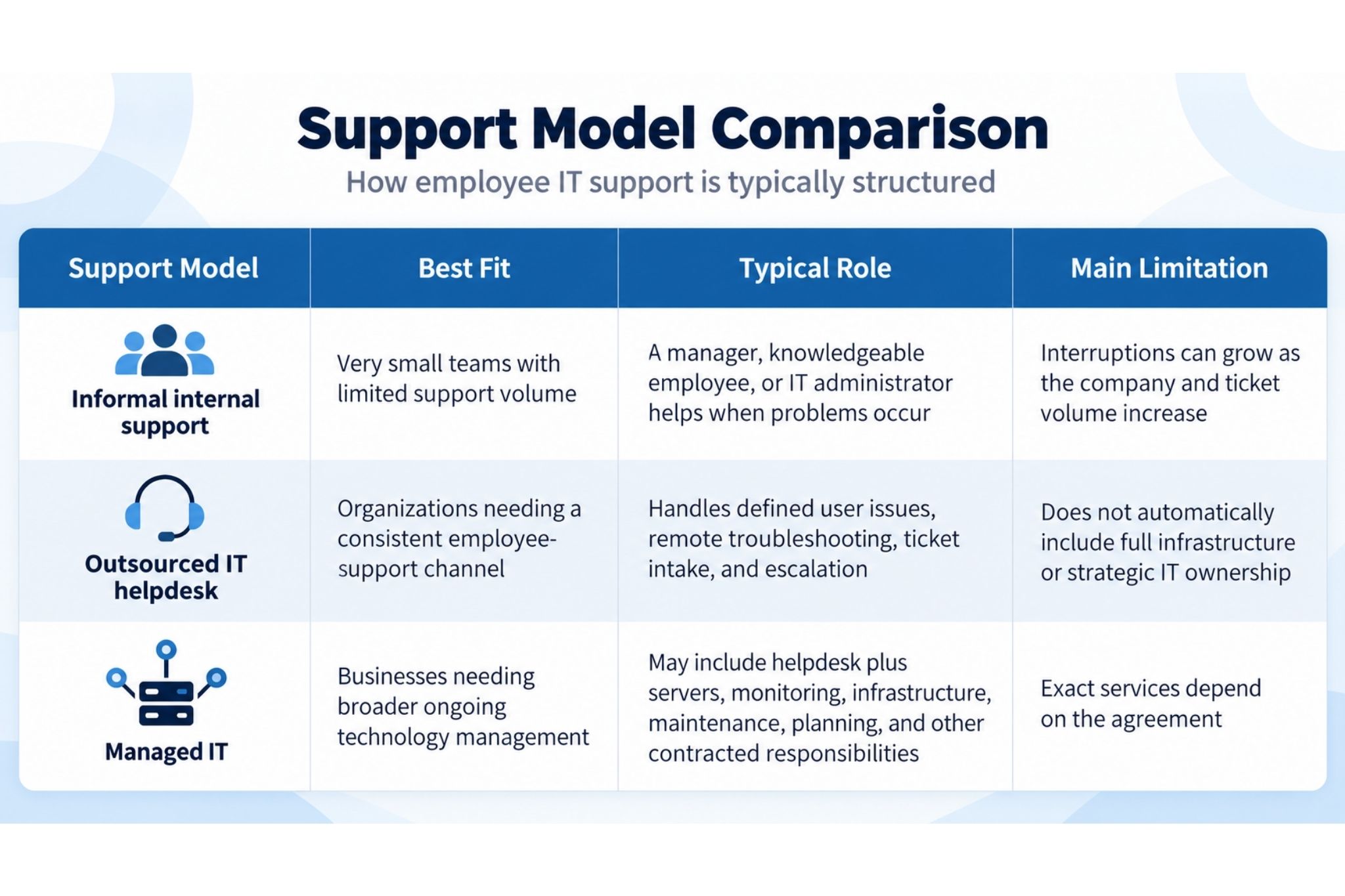
This distinction matters because a helpdesk and Managed IT are not automatically the same thing. LAComputech currently lists its helpdesk and Managed IT Services separately. Its Managed IT page describes server management, virtual technical support, remote monitoring, onsite and remote assistance, and broader technology management.
When Does Outsourcing Your IT Helpdesk Start to Make Sense?
There is no universal employee count or ticket volume that determines when outsourcing becomes appropriate.
Instead, look at what support work is doing to the organization.
Non-IT Employees Are Becoming the IT Department
An office manager who handles passwords, software issues, printer problems, and new-device questions may be helping the company in the short term.
But every support interruption takes time away from the employee's actual responsibilities.
When these interruptions become routine, the organization may need a defined support channel rather than continuing to rely on whoever happens to know the most about computers.
Senior IT Staff Are Spending Too Much Time on Routine Tickets
The same issue can affect companies that already have internal IT.
A systems administrator or IT manager may be capable of solving a password problem, application error, or workstation issue, but that does not mean it is the best use of that person's time.
An outsourced helpdesk can supplement internal personnel when day-to-day user support competes with infrastructure, cybersecurity, documentation, projects, or technology planning.
Employees Do Not Know Where to Request Help
Support becomes harder to manage when employees send issues to different managers, text individual IT staff, or ask coworkers for assistance.
A centralized support process creates clearer ownership.
It also makes it easier to see whether several apparently separate tickets are actually symptoms of the same underlying problem.
Repeated Tickets May Point to a Bigger Technology Problem
A helpdesk should not become a place where the same issue is temporarily fixed every week.
Consider recurring complaints such as:
-
Employees repeatedly losing Wi-Fi connectivity
-
Multiple users experiencing the same application failure
-
Frequent authentication problems
-
A department regularly losing access to shared resources
-
Printer connectivity problems across several workstations
-
Performance complaints affecting many employees
At that point, the problem may involve infrastructure, configuration, capacity, account management, or another system outside normal helpdesk troubleshooting.
The right response is escalation, not endless ticket closure.
NIST's Cybersecurity Framework 2.0 emphasizes clearly established and communicated roles and responsibilities. Although the framework addresses cybersecurity risk, the same ownership principle is useful when organizations define who handles employee support, infrastructure, escalation, and technical decision-making. NIST Cybersecurity Framework 2.0
If routine support is consuming internal resources but recurring issues are also revealing larger technology problems, LAComputech can help evaluate where helpdesk support should end and where broader IT management or infrastructure work should begin.
Remote Support Still Needs an Escalation Path
Remote assistance is useful, but some issues require physical access, administrator-level changes, infrastructure work, or specialist investigation.
A support model should clearly answer:
-
Which issues can the helpdesk resolve?
-
Which requests require management approval?
-
When does a ticket escalate?
-
Who handles servers, firewalls, switches, or cloud administration?
-
Who contacts software or hardware vendors?
-
When is onsite assistance required?
-
Who owns a security-related event?
-
What happens when a recurring ticket indicates a larger problem?
CISA's guidance for organizations working with managed service providers recommends clearly defining which responsibilities belong to the provider and which remain with the customer, including services purchased, services not purchased, and responsibilities around escalation and recovery. CISA guidance for MSPs and their customers
Clear ownership is particularly important when a helpdesk works alongside internal IT.
Outsourced Helpdesk vs. Broader Managed IT
An outsourced IT helpdesk primarily solves the employee-support problem.
Managed IT addresses a broader question:
Who is responsible for keeping the technology environment functioning over time?
That may involve monitoring, servers, maintenance, infrastructure, user management, support, documentation, projects, and technology planning depending on the contract.
A company can therefore need:
-
Helpdesk support only
-
Managed IT without replacing every internal responsibility
-
A co-managed arrangement where internal IT retains ownership of selected systems
-
Fully managed technology operations
-
Helpdesk support plus separate infrastructure or project assistance
The right structure depends on the organization's staff, systems, locations, risk, workload, and existing technical capabilities.
Louisiana Business Example
Consider a 40-person professional-services company in Louisiana.
Employees usually ask the operations manager for technology help because there is no dedicated support desk. Password problems, printer issues, application errors, and laptop troubleshooting interrupt the manager throughout the week.
The company introduces an outsourced help desk so employees have one support channel.
Within several weeks, support records show that Wi-Fi complaints are coming from the same area of the office. Instead of repeatedly reconnecting individual laptops, the issue is escalated for an infrastructure review.
The helpdesk solves one problem by centralizing everyday support. The ticket history helps reveal another problem that requires a different type of technical work.
That distinction is what makes structured support more useful than simply outsourcing random troubleshooting.
What Should You Clarify Before Outsourcing?
Before selecting outsourced help desk services, determine exactly what your organization expects the provider to own.
Important questions include:
-
Which employees, devices, applications, and locations are covered?
-
How should employees submit requests?
-
How are issues prioritized?
-
What happens when remote troubleshooting cannot solve the problem?
-
Is onsite assistance available when required?
-
Which systems remain the responsibility of internal IT?
-
Which requests require manager approval?
-
How are recurring problems documented and escalated?
-
What support hours apply to your agreement?
-
What reporting will management receive?
Businesses comparing providers should also understand the difference between response and resolution. LAComputech's existing article on IT support response time explains why acknowledgment, investigation, resolution, and escalation should not be treated as the same metric.
Give Employees a Clearer Path to IT Support
Outsourcing the helpdesk makes the most sense when routine support is becoming a repeated operational interruption, internal technical staff are overloaded with user issues, or employees no longer have a consistent path for getting help.
It should not be used to hide deeper technology problems. The strongest model gives users a clear support channel while also providing a defined path for issues that need infrastructure, security, onsite, or broader Managed IT expertise.
LAComputech currently provides virtual technical support through its helpdesk services and broader technology management through Managed IT.
If employee support requests are consuming internal time or your business is unsure where helpdesk responsibility should stop, call LAComputech at (855) 252-8324 or request a technology discussion through the Contact page to review your current support environment. The main phone number is confirmed on LAComputech's current Contact page.
FAQs
What is an outsourced IT helpdesk?
An outsourced IT helpdesk is an external support function that handles defined employee technology requests such as login problems, software issues, workstation troubleshooting, connectivity questions, and ticket escalation.
What problems can a remote IT helpdesk solve?
Remote support can address many user-level software, configuration, access, and device problems. Issues involving failed hardware, cabling, network equipment, or other physical systems may require onsite assistance or escalation.
What is the difference between a helpdesk and Managed IT?
A helpdesk primarily supports end users when they encounter technology problems. Managed IT can cover a broader set of agreed responsibilities such as server management, remote monitoring, infrastructure, maintenance, documentation, and technology planning.
Can a business outsource helpdesk support and keep internal IT staff?
Yes. A business can keep internal IT ownership while outsourcing defined user-support responsibilities. Clear scope, escalation rules, access, and responsibilities are important so both teams know who owns each type of issue.