Your Employees Should Not Be the First Monitoring System
If employees are the first people to report that a server is slow, an application stopped responding, or part of the network went offline, the technology problem may have been developing long before anyone noticed it.
That is where remote IT moniatoring services can add value. Instead of relying only on employee complaints or waiting for equipment to fail, monitoring gives IT teams visibility into selected servers, workstations, network devices, services, performance conditions, and system events. LAComputech currently lists remote monitoring as part of its Managed IT capabilities for businesses that need more proactive technology oversight.
For business owners, operations leaders, and IT managers, however, the important question is not simply whether something is being monitored. It is what happens after the monitoring system detects a condition that deserves attention.
What Does Remote IT Monitoring Actually Watch?
The exact scope depends on the systems, tools, and service agreement involved. Monitoring should therefore be designed around the parts of the technology environment that matter to the business rather than assuming every device requires the same level of oversight.
Common examples can include:
-
Server availability and resource usage
-
Storage capacity
-
Critical processes or services
-
Workstations that stop reporting
-
Update or patch status
-
Hardware-health conditions
-
Network-device availability
-
Bandwidth or network-performance changes
-
Repeated system errors
-
Backup or application-service status where supported
-
Events that exceed defined thresholds
Cisco describes network monitoring as a way to track factors such as device status, traffic, bandwidth utilization, uptime, failures, and performance bottlenecks. Cisco's network monitoring overview
That visibility can help an IT team notice an abnormal condition before it develops into a larger interruption. It does not mean every alert represents an emergency or that every alert can be fixed automatically.
Monitoring Is Not the Same as Fixing the Problem
One of the most important distinctions for decision-makers is:
Monitoring → Alert → Investigation → Remediation
Those are separate steps.
Monitoring
A tool observes selected systems, metrics, logs, devices, or services.
Alert
A rule, threshold, event, or condition generates a notification or other defined action.
Investigation
Someone determines what the alert means, whether it is legitimate, how serious it is, and what is causing it.
Remediation
The appropriate change, repair, escalation, restart, update, replacement, configuration adjustment, or other response is carried out.
Microsoft's Azure Monitor documentation illustrates this distinction clearly. Alert rules identify conditions, while separate action groups determine who gets notified or which configured automated actions run. Microsoft Azure Monitor action groups
An alert therefore should not automatically be interpreted as "the issue has been fixed."
What Different Monitoring Signals Can Tell You
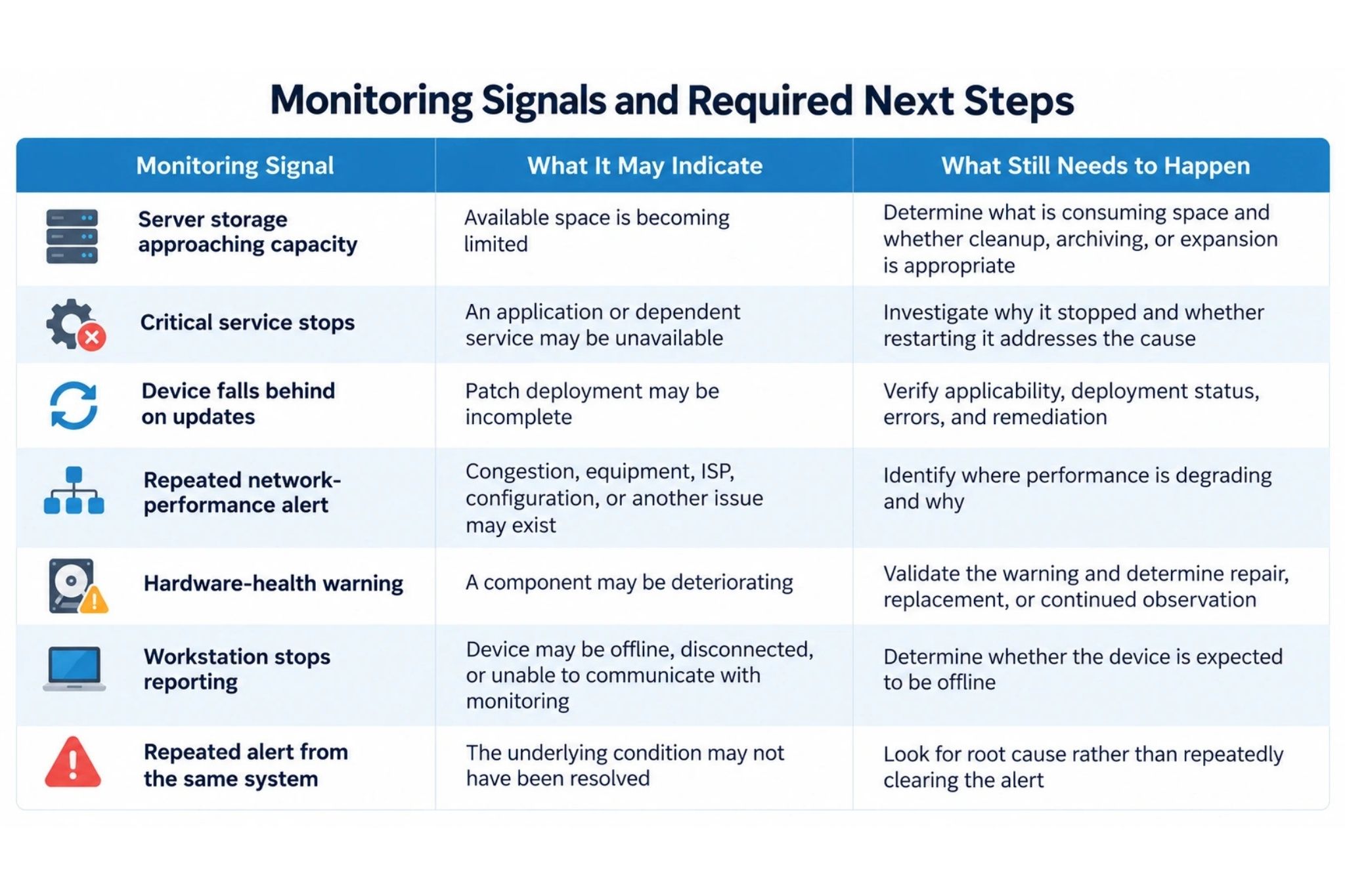
This is where proactive IT monitoring becomes useful to management. The value is not the number of alerts generated. The value comes from identifying which signals require attention and establishing a process for what happens next.
More Alerts Do Not Automatically Mean Better Monitoring
A monitoring platform that generates hundreds of low-value notifications can make important events harder to recognize.
Useful monitoring requires context.
Decision-makers should know:
-
Which systems are business-critical?
-
Which conditions warrant immediate review?
-
Which events are informational?
-
Who receives each type of alert?
-
Who investigates?
-
When does an issue escalate?
-
What actions require approval?
-
Which recurring alerts should trigger deeper analysis?
CISA recommends that organizations establish logging and monitoring procedures, configure alerts for higher-risk events, review logs regularly, and assign responsibilities for responding to suspicious activity. CISA logging and monitoring guidance
Although that guidance focuses on cybersecurity, the operational principle applies more broadly: visibility is most useful when someone is responsible for reviewing what the system reports.
If your business has monitoring tools but no clear process for who reviews alerts, investigates recurring conditions, or escalates infrastructure problems, LAComputech can help evaluate how monitoring fits into the broader Managed IT environment.
Remote Monitoring Can Reveal Problems Employees Cannot See Yet
Some technology problems are obvious. Others develop quietly.
A server may continue operating while storage gradually fills. A network connection may still function while performance becomes increasingly inconsistent. A workstation may miss updates without affecting the employee immediately. A process may fail repeatedly but restart before users notice.
Business IT monitoring can provide earlier visibility into these conditions.
That does not guarantee that downtime will be prevented. Some failures happen suddenly, external services can experience outages, hardware can fail without meaningful warning, and not every technology problem can be predicted.
The more realistic objective is better visibility and a stronger opportunity to investigate conditions before they become larger operational issues.
LAComputech's Managed IT Services currently include remote monitoring, server management, remote support, and other ongoing technology-management capabilities.
Monitoring Also Helps Businesses Recognize Patterns
Individual alerts can be useful, but trends often provide more context.
Suppose a business sees one server-capacity alert. That may be a straightforward issue.
Now suppose the same server produces repeated capacity warnings every month despite temporary cleanup. The pattern may indicate that storage requirements are growing faster than the existing environment can comfortably support.
The same logic applies to:
-
Recurring network-performance problems
-
Devices repeatedly failing updates
-
Repeated application-service failures
-
Growing resource consumption
-
Hardware warnings that continue returning
-
A group of devices consistently producing similar support problems
Cisco notes that monitoring data collected over time can also help administrators anticipate future infrastructure requirements. Cisco
That makes remote monitoring relevant not only to troubleshooting but also to planning.
Remote Monitoring vs. Preventative Maintenance
These concepts overlap, but they are not identical.
Remote monitoring provides visibility into selected systems and conditions.
Preventative maintenance may involve scheduled work such as updates, diagnostics, hardware reviews, software maintenance, configuration changes, testing, and other proactive tasks.
LAComputech's existing guide to preventative IT maintenance already covers monitoring as one part of a broader maintenance strategy.
The distinction matters because a monitoring system can tell you something needs attention. Maintenance, troubleshooting, or infrastructure work may still be necessary to address it.
Repeated Server Alerts
Consider a Louisiana professional-services company with a server supporting important shared business applications.
Monitoring begins reporting high resource usage during the busiest part of the workday.
The server has not gone offline, so employees have not reported an outage. Instead of waiting for complaints, the IT team reviews the pattern.
Investigation shows that resource demand has been rising as more employees and applications use the system.
At this point, the business has information it can act on. The right response might involve application review, configuration changes, capacity planning, hardware changes, or another technical approach depending on the actual cause.
Monitoring did not solve the problem by itself.
It created visibility early enough for the organization to investigate it.
What Should Businesses Expect From Remote IT Monitoring Services?
When evaluating remote IT monitoring services, ask more than "Do you monitor our systems?"
Decision-makers should understand:
-
What devices and systems are actually covered
-
What information is monitored
-
Which thresholds or conditions create alerts
-
Who receives those alerts
-
What happens after an alert fires
-
Which issues can be handled remotely
-
Which issues require approval or onsite work
-
How recurring problems are escalated
-
What documentation or reporting is provided
-
Which responsibilities remain with internal staff
This is particularly important for organizations using a co-managed model. LAComputech's article on co-managed IT vs. managed IT explains why ownership for monitoring, support, infrastructure, projects, and escalation should be clearly divided.
NIST's Cybersecurity Framework 2.0 similarly separates detection from response as distinct functions, reinforcing the broader principle that identifying an event and responding to it are not the same activity. NIST Cybersecurity Framework 2.0
Turn Monitoring Data Into Technology Decisions
The strongest monitoring strategy is not the one with the most dashboards or alerts.
It is the one that helps the organization understand what is happening, identify what deserves attention, assign responsibility, investigate recurring issues, and make better technology decisions before employees are left reacting to the consequences.
LAComputech provides Managed IT services that currently include remote monitoring capabilities for servers, workstations, networks, and broader technology environments.
If your business is still relying primarily on employee complaints to discover technology problems, call LAComputech at (855) 252-8324 or use the Contact page to discuss your current IT environment and whether remote monitoring should play a larger role in how your systems are managed. The phone number is currently listed on LAComputech's Contact page.
FAQs
What are remote IT monitoring services?
Remote IT monitoring services use monitoring tools to observe selected servers, workstations, network devices, services, metrics, or events so IT teams can identify conditions that may require investigation.
Can remote IT monitoring prevent downtime?
Monitoring can provide earlier visibility into some developing problems, but it cannot guarantee that downtime will be prevented. Sudden hardware failures, external outages, software faults, and other issues may still occur.
What is the difference between monitoring and an alert?
Monitoring is the ongoing observation of selected systems or conditions. An alert is generated when defined criteria are met. The alert normally still requires investigation, escalation, or a configured automated action before the underlying issue is addressed.
Is remote monitoring the same as Managed IT?
No. Remote monitoring can be one component of Managed IT, but broader Managed IT responsibilities may also include support, server management, maintenance, planning, infrastructure work, and other services defined by the agreement.